
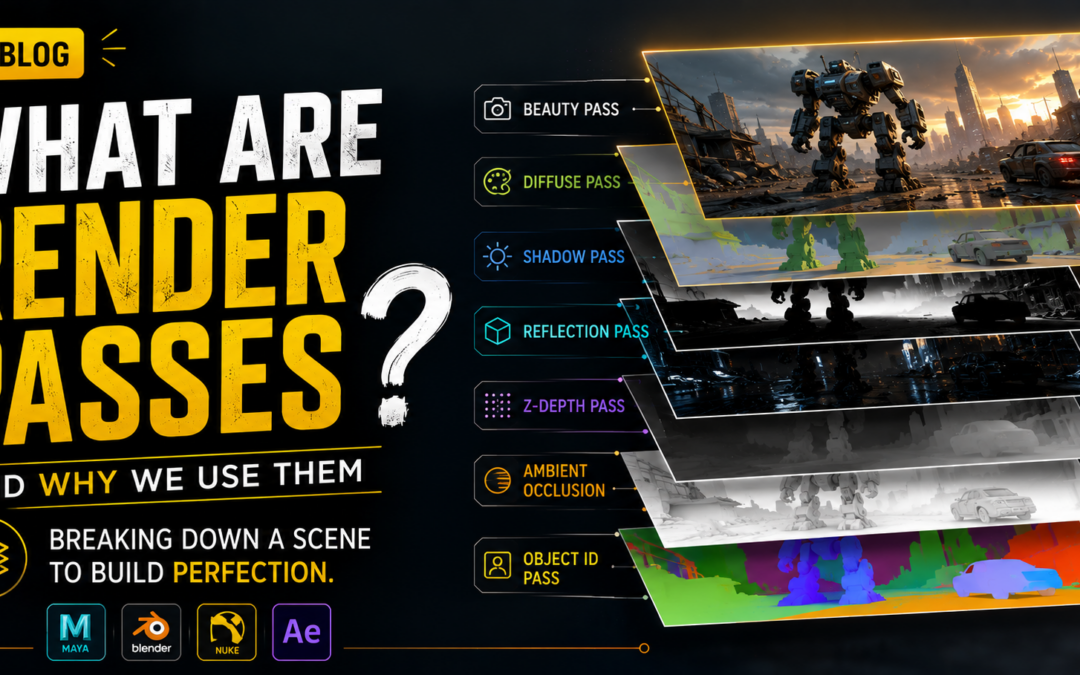
What Are Render Passes and Why Do We Use Them? A Beginner’s Guide for VFX, Animation & Compositing
Introduction
When watching a visually stunning movie scene, animation sequence, or realistic CGI shot, audiences usually notice the final polished image. They see cinematic lighting, beautiful reflections, realistic shadows, detailed textures, and smooth visual effects working together perfectly. But behind that final render, artists rarely create everything as one single output. Instead, professional studios break scenes into multiple layers called Render Passes in VFX.
Render passes are one of the most important parts of animation, CGI, compositing, and visual effects production. They give artists more control over lighting, shadows, reflections, depth, and adjustments after rendering.
This workflow saves time, improves flexibility, and allows VFX teams to make creative changes without rendering the entire scene again.
For beginners, render passes may feel technical at first. But once understood, they become one of the most powerful tools in professional production.
In this blog, we will understand what render passes are, why we use them, and how they help in animation, VFX, and compositing workflows.
What Are Render Passes?
Render Passes in VFX are separate image outputs created from a single 3D scene.
Instead of rendering everything together in one final image, the software separates elements into layers.
Each pass contains specific visual information.
For example:
- lighting
- shadows
- reflections
- depth
- object masks
- highlights
These separate layers are later combined during compositing.
This gives artists complete control over the final visual.
Why Do We Use Render Passes?
Rendering complex scenes takes time.
If everything is rendered as one image and something needs correction, artists may need to render the entire scene again.
That can waste hours or even days.
Using Render Passes in VFX helps artists:
- fix individual elements faster
- control lighting later
- improve compositing flexibility
- save rendering time
- enhance scene quality
- create cinematic control
This is why professional studios always use render passes.
How Render Passes Work
Imagine rendering a 3D city scene.
Instead of one final image, software exports separate passes like:
- beauty pass
- shadow pass
- reflection pass
- diffuse pass
- Z-depth pass
Later, compositing artists combine everything inside software.
This workflow creates more control than one flat render.
That is the main reason Render Passes in VFX are used in production.
Beauty Pass
The beauty pass is the primary render.
It contains:
- textures
- lighting
- reflections
- shadows
- materials
It looks closest to the final image.
Even though it is useful, studios still need additional passes for adjustments.
Beauty pass works as the main foundation in Render Passes in VFX.
Diffuse Pass
Diffuse pass contains base color and surface texture without reflections or highlights.
It helps artists control:
- object color
- brightness
- material appearance
If colors need fixing later, diffuse pass makes editing easier.
This pass is extremely useful during compositing.
Shadow Pass
Shadow pass stores only shadow information.
Artists use it to:
- darken scenes
- soften shadows
- increase contrast
- improve realism
Shadows are critical for believable visuals.
This makes shadow pass important in Render Passes in VFX.
Reflection Pass
Reflection pass contains reflected light and shiny surfaces.
Examples:
- glass reflections
- metallic surfaces
- polished floors
- vehicles
Artists can increase or reduce reflections during compositing.
This creates more flexibility without re-rendering.
Specular Pass
Specular pass controls bright highlights.
Examples include:
- shiny skin highlights
- metal reflections
- sunlight sparkle
- glossy surfaces
Specular highlights make visuals feel more realistic.
This pass adds cinematic polish.
Ambient Occlusion Pass
Ambient occlusion creates natural contact shadows.
It darkens areas where objects meet.
Examples:
- corners of rooms
- edges of furniture
- clothing folds
It improves depth and realism.
Many VFX artists use this pass heavily.
Z-Depth Pass
Z-depth stores distance information.
Objects closer to camera appear different from objects farther away.
Artists use it for:
- depth of field
- fog effects
- atmosphere
- focus blur
This is one of the most powerful Render Passes in VFX.
It helps create cinematic depth.
Object ID / Matte Pass
Object ID helps separate objects.
Each object gets a unique mask.
Artists can quickly edit:
- one character
- one vehicle
- one wall
- background elements
This saves time during compositing.
Object masks are extremely helpful in production pipelines.
Render Passes in Compositing
After rendering, passes are combined inside compositing tools like:
- Nuke
- Adobe After Effects
Artists can:
- adjust brightness
- fix shadows
- add glow
- control reflections
- enhance atmosphere
Compositing becomes much easier with Render Passes in VFX.
Render Passes in Animation
Animation projects use render passes for:
- character lighting
- environment control
- cinematic color grading
- scene adjustments
A studio may render thousands of frames.
Render passes help manage complex scenes efficiently.
Render Passes in VFX Production
In VFX, render passes help create:
- explosions
- fantasy creatures
- environment extensions
- cinematic lighting
Artists can separately control every visual detail.
That flexibility is why Render Passes in VFX are industry standard.
Software Used for Render Passes
Professional artists create render passes using:
- Autodesk Maya
- Blender
- Cinema 4D
- Arnold Renderer
- V-Ray
Each software supports advanced render layers and compositing workflows.
Why Render Passes Save Time
Without passes:
One small change = full render again.
With passes:
- fix only reflection
- adjust only shadow
- blur background
- improve highlights
This saves:
- time
- rendering cost
- production effort
Very important in studio deadlines.
Common Beginner Mistakes
Many beginners struggle because they:
- ignore render layers
- forget naming structure
- export wrong passes
- overcomplicate compositing
- skip organization
Good workflow matters.
Render passes become easier with practice.
Tips for Beginners
If learning Render Passes in VFX, start with:
- beauty pass
- diffuse pass
- shadow pass
- Z-depth pass
Then gradually explore:
- ambient occlusion
- reflections
- matte IDs
Practice simple scenes first.
Understanding passes visually makes learning faster.
Career Benefits of Learning Render Passes
Render pass knowledge helps in roles like:
- compositor
- lighting artist
- rendering artist
- VFX artist
- animation pipeline artist
Studios value artists who understand rendering workflows.
Future of Render Passes
Rendering technology continues improving.
Now studios use:
- real-time rendering
- GPU rendering
- AI-assisted rendering
- virtual production pipelines
Even with faster technology, Render Passes in VFX remain extremely important.
Because artists always need control.
Final Thoughts
Render passes may seem technical in the beginning—but they are one of the smartest workflows in animation and VFX.
They separate scenes into layers and give artists complete control over the final visual.
From lighting and shadows to reflections and cinematic depth, Render Passes in VFX help teams work faster, smarter, and more creatively.
For students learning VFX, animation, or compositing, understanding render passes is a valuable professional skill.
Because in production, flexibility matters—and render passes create that flexibility beautifully.
Recent Comments