
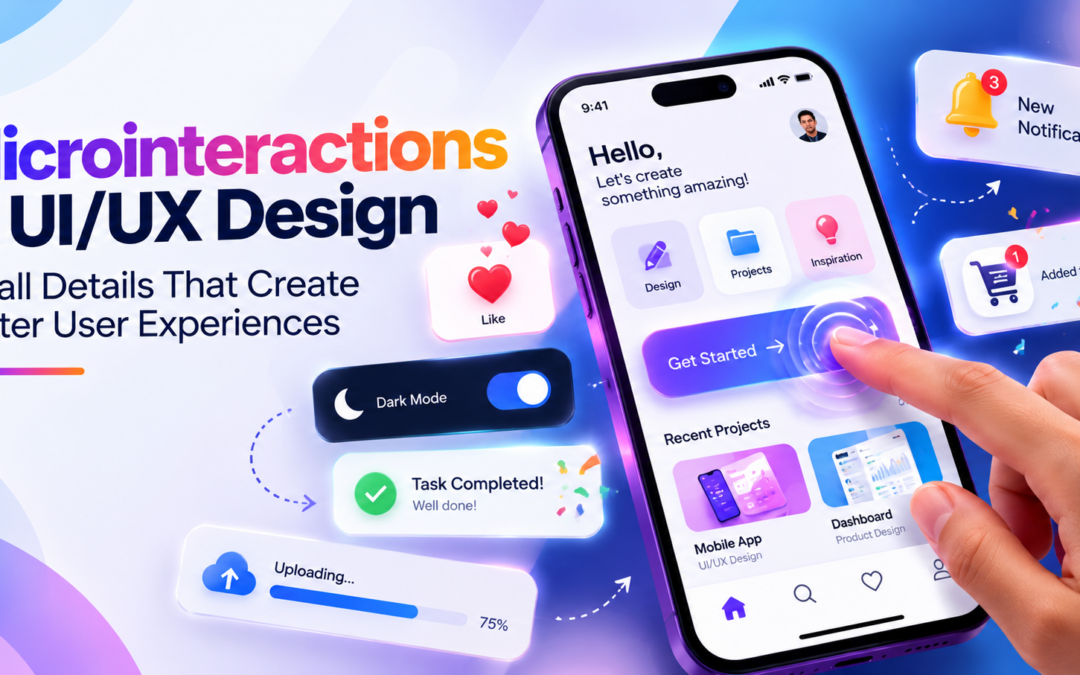
Microinteractions in UI/UX Design: Small Details That Create Better User Experiences
Have you ever noticed how a button changes colour when you click it, how a heart icon fills when you like a post, or how a shopping cart displays a small animation after adding a product? These tiny interactions may seem insignificant, but they play an important role in making digital products enjoyable and easy to use.
Modern applications and websites are not just about attractive layouts and useful features. They are also about how users interact with every element on the screen. Small visual responses, animations, notifications, and feedback messages help users understand what is happening and what they should do next.
This is where Microinteractions in UI/UX Design become important. They are small, focused interactions that respond to user actions and make digital experiences more intuitive, engaging, and meaningful.
From mobile applications and e-commerce websites to banking platforms and productivity tools, microinteractions help create smoother experiences. They guide users, communicate system status, prevent confusion, and make everyday digital activities feel more natural.
In this blog, let’s explore what microinteractions are, how they work, their benefits, real-world examples, design principles, and the skills aspiring UI/UX designers should develop.
What Are Microinteractions in UI/UX Design?
Microinteractions are small interface responses designed to support a specific user action or communicate information. They usually happen when someone clicks a button, submits a form, changes a setting, receives a notification, or performs another activity within a digital product.
For example, when you enter an incorrect password and see a message explaining the problem, that is a microinteraction. Similarly, when a toggle switch smoothly changes from OFF to ON, it provides visual feedback about your action.
Microinteractions in UI/UX Design focus on making these small moments meaningful and understandable.
Unlike major interface components such as navigation menus, dashboards, or complete page layouts, microinteractions concentrate on individual actions. Their purpose is to make an interface feel responsive without distracting users from their main goals.
A well-designed microinteraction should be simple, purposeful, consistent, and easy to understand.
The Four Main Parts of a Microinteraction
A microinteraction generally consists of four important components. Understanding these components helps designers create interactions that behave predictably.
Trigger
A trigger starts the interaction. It can be initiated by a user action or by the system.
Examples include:
- Clicking a button.
- Hovering over an icon.
- Swiping a mobile screen.
- Receiving a new notification.
- Reaching a particular loading or progress state.
For example, clicking a favourite icon can trigger an animation that changes the icon from an outline to a filled heart.
Rules
Rules define what happens after the trigger. They determine how the interface responds to the user’s action.
For example, when a user clicks a bookmark icon, the system saves the selected item and changes the icon’s appearance to indicate that the action is complete.
Feedback
Feedback communicates the result of the interaction. It can be visual, auditory, or sometimes haptic.
Examples include:
- A button changing colour.
- A success message appearing.
- A loading spinner displaying progress.
- A mobile device vibrating after an action.
- A notification confirming a successful payment.
Good feedback helps users understand whether the system has received and processed their request.
Loops and Modes
Loops and modes define how an interaction behaves over time and under different conditions.
For example, a notification may disappear automatically after a few seconds, while a password visibility button changes between hidden and visible modes.
These four components help designers structure Microinteractions in UI/UX Design and ensure that every interaction has a clear purpose.
Common Examples of Microinteractions in Everyday Applications
Microinteractions are present in almost every digital product we use. Many users interact with them daily without consciously noticing their design.
Here are some familiar examples.
Like and Favourite Animations
Social media platforms use animated heart icons and reaction buttons to make interactions feel responsive.
When users like a post, the icon changes appearance, sometimes with a small animation. This provides immediate confirmation that the action was registered.
Button Hover Effects
When users move their mouse over a button, its background colour, border, or appearance may change.
This indicates that the element is interactive and can be selected.
Form Validation Messages
Online registration forms often display messages when users enter incomplete or incorrect information.
For example, a password field may show a message indicating that the password must contain a specific number of characters.
These interactions help users correct mistakes without restarting the entire process.
Loading Indicators
When users upload documents, process payments, or submit forms, loading indicators communicate that the system is working.
Without these indicators, users may assume that the application has stopped responding.
Toggle Switches
Toggle switches are commonly used for enabling or disabling settings such as dark mode, notifications, location access, and privacy preferences.
A smooth transition between ON and OFF states makes the current setting easier to understand.
Shopping Cart Feedback
E-commerce applications often display a small animation or confirmation message when users add products to their shopping carts.
This reduces uncertainty and helps users continue shopping without navigating away from the current page.
These examples demonstrate how Microinteractions in UI/UX Design can improve usability across different types of digital platforms.
Why Are Microinteractions Important in Modern UI/UX Design?
A successful digital product should not only look attractive but also communicate clearly with its users. Small interactions help establish this communication.
Improve User Experience
Users expect digital interfaces to respond quickly to their actions. Microinteractions provide immediate feedback, making applications feel more responsive and easier to navigate.
Reduce User Confusion
Imagine submitting a payment form without receiving any confirmation. You might wonder whether the transaction was successful or whether you should try again.
A clear success message or confirmation animation removes this uncertainty.
Increase User Engagement
Thoughtful animations and interactive responses can make applications feel more enjoyable.
For example, a progress animation can encourage users to complete a profile setup or finish an onboarding process.
Prevent User Errors
Microinteractions can highlight missing information, invalid inputs, and incorrect actions before users move to the next step.
This is especially useful in banking applications, registration forms, and e-commerce checkout processes.
Build Trust and Confidence
Clear feedback helps users understand how an application behaves. When every important action receives an appropriate response, users are more likely to feel confident using the product.
This is why Microinteractions in UI/UX Design are considered an important part of creating user-friendly digital experiences.
Best Practices for Designing Effective Microinteractions
Creating attractive animations is not enough. Designers must understand when, where, and why an interaction should appear.
Here are some important practices to follow.
Keep Interactions Simple
Microinteractions should communicate information without distracting users.
Avoid unnecessary animations, excessive movement, or complicated transitions. A small visual response is often more effective than a lengthy animation.
Provide Immediate Feedback
Users should receive feedback as quickly as possible after performing an action.
For example, when someone clicks a submit button, the interface should indicate that the request has been received.
Maintain Design Consistency
Buttons, icons, notifications, and animations should follow consistent visual patterns throughout the application.
If similar actions behave differently across multiple screens, users may become confused.
Focus on Purpose
Every interaction should solve a problem or communicate something useful.
Before adding an animation, designers should ask whether it helps users understand an action, provides feedback, or improves navigation.
Consider Accessibility
Not every user interacts with digital products in the same way.
Designers should consider keyboard navigation, screen readers, sufficient colour contrast, and reduced-motion preferences.
Important information should never be communicated through animation or colour alone.
Optimize Performance
Animations should run smoothly across different screen sizes and devices.
Heavy effects can affect performance, particularly on older smartphones. Designers should work with developers to ensure that interactions remain lightweight and responsive.
Following these principles helps create effective Microinteractions in UI/UX Design without compromising usability.
Popular Tools for Creating Microinteractions
UI/UX designers use different tools to create prototypes, animations, and interactive interface components.
Some popular tools include:
Figma: Useful for designing interfaces, creating interactive prototypes, and testing basic transitions between screens.
Adobe After Effects: Helps designers create advanced motion graphics and detailed animation concepts.
ProtoPie: Supports realistic interactive prototypes with more advanced user interactions and logic.
Framer: Allows designers to build interactive web experiences with animations and responsive behaviours.
Lottie: Helps deliver lightweight animations that can be integrated into websites and mobile applications.
Principle: Useful for designing and demonstrating animated user-interface interactions.
Designers should select tools according to project requirements, team workflows, and the complexity of the interaction.
Real-World Applications Across Different Industries
Microinteractions are not limited to social media or entertainment applications. They are useful in several industries where clear communication and smooth digital experiences matter.
E-commerce: Product selection, cart updates, wishlist animations, checkout validation, and order confirmation messages.
Banking and Finance: Payment confirmations, transaction status indicators, account verification, and security alerts.
Healthcare: Appointment booking confirmations, form validation, medication reminders, and patient dashboard notifications.
Education: Quiz feedback, course progress indicators, assignment submission confirmations, and interactive learning activities.
Travel and Hospitality: Booking confirmations, seat selection feedback, search filters, and travel status notifications.
Productivity Applications: Task completion animations, file upload indicators, calendar reminders, and synchronization notifications.
Across these industries, Microinteractions in UI/UX Design help simplify complex processes by providing clear and timely responses.
How to Create Microinteractions: A Practical Workflow
Aspiring designers can follow a simple workflow to understand and develop their own microinteraction concepts.
- Identify the user action: Choose an action such as clicking a button, submitting a form, or enabling a setting.
- Understand the user’s expectation: Determine what information or feedback the user needs after performing that action.
- Design the trigger and response: Decide what starts the interaction and how the interface should respond.
- Create a prototype: Use Figma, ProtoPie, or another suitable tool to demonstrate the interaction.
- Test the experience: Check whether users understand the response and can complete the action without confusion.
- Refine the interaction: Improve timing, animation, accessibility, and consistency based on testing results.
For example, a designer creating a login screen could develop a microinteraction that highlights an incorrect password field, displays a helpful message, and allows users to correct their information immediately.
A collection of such practical exercises can become a valuable addition to a UI/UX design portfolio.
Career Opportunities for Aspiring UI/UX Designers
As businesses continue to invest in websites, mobile applications, SaaS platforms, and digital services, the demand for designers who understand user behaviour and interaction design remains relevant.
Knowledge of microinteractions can strengthen a designer’s ability to create polished and functional interfaces.
Some career opportunities include:
- UI Designer
- UX Designer
- Product Designer
- Interaction Designer
- Visual Designer
- Motion UI Designer
- UX Researcher
- Digital Experience Designer
Students interested in these careers should develop a strong understanding of user research, wireframing, prototyping, visual design, interaction design, and usability testing.
Learning Microinteractions in UI/UX Design can help aspiring professionals demonstrate attention to detail and a deeper understanding of how people interact with digital products.
Future of Microinteractions in UI/UX Design
Digital experiences are becoming more interactive, personalised, and responsive. As technologies such as artificial intelligence, voice interfaces, wearable devices, and augmented reality continue to develop, interaction design will evolve as well.
Future interfaces may use contextual feedback to respond more intelligently to user behaviour. For example, an application could provide adaptive guidance based on the user’s progress, preferences, or current activity.
Voice-enabled interfaces may introduce subtle visual responses that confirm when a command has been recognised. Wearable devices may combine visual, audio, and haptic feedback to communicate information without requiring users to open an application.
However, the fundamentals will remain important. Interactions must be understandable, accessible, consistent, and useful.
The future of Microinteractions in UI/UX Design will not simply be about creating more animations. It will be about designing meaningful responses that make technology easier and more natural to use.
Conclusion
Small details can make a significant difference in how people experience digital products. From button animations and loading indicators to form validation and payment confirmations, microinteractions help users understand what is happening and what to do next.
Microinteractions in UI/UX Design are an essential part of creating intuitive, responsive, and engaging digital experiences. When designed thoughtfully, they reduce confusion, improve usability, build user confidence, and make everyday interactions feel effortless.
For aspiring UI/UX designers, learning these techniques is an excellent way to strengthen practical design skills and create more professional portfolios.
At MAAC Marathahalli, students interested in UI/UX design can explore interface design, prototyping, visual communication, and interaction design to prepare for opportunities in the evolving digital industry.
Remember, great user experiences are not always created through big features. Sometimes, the smallest interactions make the biggest difference.
Recent Comments