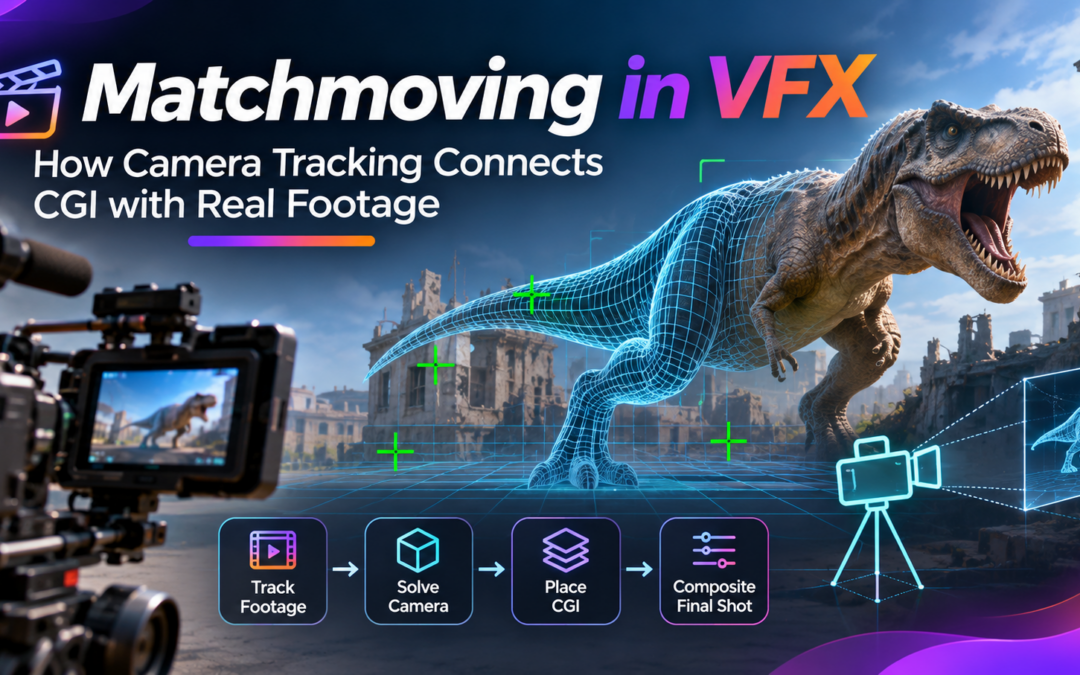
Matchmoving in VFX: How Camera Tracking Connects CGI with Real Footage
Have you ever watched a movie scene where a giant robot walks through a real city, a spaceship flies above a building, or a digital creature interacts with live-action actors? These visuals may look completely natural, but combining computer-generated imagery with real footage requires more than simply placing a 3D object into a video.
The digital elements must follow the original camera movement, perspective, scale, and positioning. Otherwise, they may appear to float, slide, or move unnaturally within the scene.
This is where Matchmoving in VFX becomes essential. It is a specialised visual effects technique that reconstructs camera movement and helps artists integrate computer-generated objects into live-action footage with realistic positioning and motion.
From Hollywood films and television commercials to gaming cinematics and virtual production, matchmoving plays an important role in modern visual effects pipelines.
In this blog, let’s explore what matchmoving is, how camera tracking works, the complete production workflow, popular software, real-world applications, common challenges, and the skills aspiring VFX artists should develop.
What Is Matchmoving in VFX?
Matchmoving, also known as camera tracking or 3D tracking, is the process of analysing recorded footage to recreate the movement and characteristics of the original camera in a digital 3D environment.
When filmmakers capture a moving shot, the camera records the scene from changing positions and angles. If a VFX artist wants to insert a computer-generated object into that footage, the virtual camera must reproduce the original camera’s movement as accurately as possible.
Matchmoving in VFX makes this possible by identifying visual features in the footage, tracking their movement across frames, and calculating the camera’s position, orientation, and other relevant parameters.
For example, imagine a camera moving through a street while filming a building. A VFX artist may want to add a giant digital creature standing on the rooftop. The creature must remain correctly positioned as the camera moves, including changes in perspective and apparent scale.
Without an accurate camera match, the creature could appear disconnected from the environment.
Matchmoving creates the foundation for integrating these digital elements into the original shot.
Matchmoving vs Camera Tracking: What Is the Difference?
The terms matchmoving and camera tracking are frequently used together, but they can describe slightly different parts of the same workflow.
Camera tracking generally refers to identifying and analysing the movement of visual features in footage to estimate the original camera’s motion.
Matchmoving often refers to the broader process of using that tracking information to recreate the camera movement and integrate digital elements into the live-action scene.
A simple way to understand the difference is:
- Camera tracking identifies how the camera and visible scene features move.
- Camera solving calculates the virtual camera’s movement in 3D space.
- Matchmoving applies the solved camera and scene information to align CGI with the original footage.
These processes work together to produce believable visual effects.
How Does Matchmoving in VFX Work?
A successful matchmove depends on accurately analysing the original footage and reconstructing its camera movement.
Here are the major stages involved.
Footage Analysis
The process begins with examining the original video sequence.
Artists study the camera movement, visible objects, lighting conditions, motion blur, image quality, and available tracking features.
They also identify areas that may create tracking difficulties, such as reflective surfaces, moving characters, repetitive textures, and objects that temporarily disappear behind other elements.
Good footage analysis helps artists select the appropriate tracking approach before beginning the technical process.
Feature Tracking
The software identifies distinctive visual details in the footage, such as corners, edges, marks, and textured surfaces.
These features are tracked across multiple frames to determine how their positions change as the camera moves.
For example, the corners of a building, road markings, windows, and other stationary details can provide useful tracking information.
In Matchmoving in VFX, reliable feature tracking is important because inaccurate tracking points can affect the quality of the final camera solution.
Artists may also create manual tracking points when automatic tracking struggles with difficult footage.
Camera Solving
After tracking the visual features, the software analyses their movement and estimates the original camera’s position, orientation, and relevant lens characteristics.
This process is known as camera solving.
The software uses the relationships between tracked points across different frames to reconstruct a virtual camera that reproduces the movement seen in the original footage.
A successful camera solve provides a 3D camera and spatial information that artists can use in their digital scenes.
Creating the 3D Scene
Once the camera has been solved, artists establish the coordinate system, ground plane, reference points, and other scene information.
This step helps determine where digital objects should be positioned.
For example, if a CGI vehicle needs to drive along a real road, the artist must establish the road’s position and orientation within the reconstructed 3D environment.
The scene setup helps ensure that the digital object follows the correct perspective and spatial relationships.
CGI Integration and Compositing
The solved camera is transferred into a 3D application or compositing environment.
Artists then position their digital assets, animate them if necessary, and render the required visual elements.
The rendered elements are combined with the original footage through compositing. Colour correction, lighting adjustments, shadows, reflections, motion blur, and other finishing techniques help make the integration convincing.
A technically accurate camera track is only one part of the final result. The CGI must also match the visual characteristics of the real environment.
Popular Software Used for Matchmoving
Professional VFX artists use specialised software for tracking, camera solving, 3D scene reconstruction, and compositing.
Some widely used tools include:
3DEqualizer: A specialised camera tracking and matchmoving application used for reconstructing camera movement and solving complex shots.
PFTrack: Provides camera tracking, object tracking, scene reconstruction, and other tools for visual effects workflows.
SynthEyes: Supports automated and manual tracking, camera solving, lens analysis, and exporting tracking data to 3D applications.
Foundry Nuke: Includes CameraTracker tools for generating virtual cameras, point clouds, and 3D scene information from footage.
Autodesk Maya: Used to import tracking data, build 3D scenes, position assets, animate objects, and render CGI elements.
Adobe After Effects: Offers 3D Camera Tracker functionality for creating tracked cameras and integrating graphics or 3D elements into footage.
Maxon Cinema 4D: Provides motion tracking capabilities for reconstructing camera movement and integrating 3D objects with recorded footage.
The choice of software depends on shot complexity, production requirements, artist experience, and the existing studio pipeline.
Real-World Applications of Matchmoving in VFX
Matchmoving is used across several areas of film, television, advertising, and digital content production.
Film and Television Production
Large film productions frequently combine live-action footage with computer-generated environments, characters, and objects.
For example, filmmakers may shoot actors on a real street and later add digital buildings, flying vehicles, or large-scale environments.
Matchmoving in VFX helps these elements follow the original camera movement and maintain their correct perspective throughout the shot.
Adding CGI Characters and Creatures
Digital creatures and characters often interact with real actors and physical environments.
A creature walking through a forest, standing beside an actor, or moving through a city requires accurate positioning within the original footage.
Camera tracking helps artists maintain the relationship between the digital character and the filmed environment.
Product Advertisements
Commercial productions often use CGI to showcase products with visual effects that would be difficult or expensive to capture physically.
For example, a digital bottle, smartphone, or vehicle may be inserted into a live-action advertisement.
Matchmoving helps the product remain correctly aligned with the camera movement, making the final commercial look more realistic.
Set Extensions and Environment Creation
Sometimes filmmakers capture only part of a location and extend the environment digitally.
A real building may be surrounded by additional CGI structures, landscapes, or architectural details.
An accurate camera solution helps the digital extensions maintain the correct perspective as the camera moves.
Gaming Cinematics and Virtual Production
Game cinematics and virtual production workflows can combine recorded performances with digital environments and assets.
Camera tracking information helps artists align the virtual camera and digital scene with the original footage or production camera setup.
These applications demonstrate why Matchmoving in VFX is an important skill in professional visual effects production.
Common Challenges in Matchmoving
Although modern tracking software can automate many tasks, creating a reliable matchmove still requires technical knowledge and careful observation.
Motion Blur
Fast camera movement can create motion blur, making it difficult for software to identify consistent tracking features.
Artists may need to select clearer features or manually correct tracking points.
Low-Detail Environments
Plain walls, empty skies, smooth floors, and surfaces without visible texture provide fewer tracking features.
This can make camera solving more difficult.
Moving Objects
People, vehicles, animals, and other moving objects can interfere with camera tracking.
Artists often need to mask or exclude these areas so the software focuses on stationary features in the environment.
Reflective and Transparent Surfaces
Mirrors, glass, water, and reflective materials can create misleading visual information because their appearance changes with camera movement.
These surfaces require additional attention during tracking and scene reconstruction.
Incorrect Camera Information
Missing or inaccurate focal length, sensor size, lens distortion, and camera metadata can affect the quality of the solution.
Whenever possible, artists should use reliable camera information and validate the reconstructed camera against the original footage.
Camera Solve Errors
An inaccurate solve can cause inserted CGI elements to slide, drift, or appear disconnected from the environment.
Artists must review the tracking points, refine the solution, and check the final result across the complete sequence.
Understanding these challenges helps artists produce more reliable Matchmoving in VFX results.
Skills Required to Become a Matchmove Artist
Matchmoving requires a combination of technical understanding, observation, and problem-solving abilities.
Aspiring artists should focus on developing the following skills:
- Camera fundamentals: Understand focal length, perspective, sensor size, camera movement, and lens distortion.
- 3D tracking: Learn how to identify, create, and refine tracking points.
- Camera solving: Understand how software reconstructs camera movement and estimates scene information.
- 3D fundamentals: Develop knowledge of coordinate systems, geometry, transforms, and spatial relationships.
- Compositing: Learn how CGI elements are integrated with live-action footage.
- Software proficiency: Practise with tools such as 3DEqualizer, PFTrack, SynthEyes, Nuke, Maya, and After Effects.
- Problem-solving: Develop the ability to identify tracking errors, evaluate camera solves, and refine difficult shots.
A strong portfolio should include different types of camera movements, such as handheld shots, tracking shots, moving vehicles, and architectural environments.
Showing the original footage alongside the tracked camera, 3D scene, and final composite can help demonstrate practical skills to potential employers.
Career Opportunities in Matchmoving and VFX
Matchmoving is an important specialisation within the visual effects industry. It supports compositing, 3D integration, environment creation, and other production departments.
Some relevant career opportunities include:
- Matchmove Artist
- Camera Tracking Artist
- 3D Tracking Artist
- VFX Compositor
- 3D Generalist
- Environment Artist
- VFX Technical Artist
- Camera Tracking Supervisor
Students interested in this field should build a strong foundation in camera tracking, 3D software, compositing, and visual effects production workflows.
Learning Matchmoving in VFX can help aspiring artists understand how real-world camera footage and digital environments work together in professional productions.
The Future of Matchmoving in VFX
Camera tracking technology continues to evolve with improvements in computer vision, automated feature detection, lens analysis, and real-time production tools.
Modern software can automate many parts of the tracking process, helping artists generate initial camera solutions and reconstruct scene information more efficiently.
AI-assisted tools may further support difficult tracking situations, reduce repetitive manual work, and improve workflow efficiency.
However, automation does not eliminate the need for experienced artists. Complex shots still require human judgement, accurate camera information, scene understanding, and careful validation.
The future of Matchmoving in VFX will likely involve closer integration between automated tracking systems, real-time engines, 3D applications, and compositing pipelines.
For aspiring artists, learning the fundamentals of camera movement and 3D reconstruction will remain valuable even as software becomes more advanced.
Conclusion
Matchmoving is one of the important techniques that connects real-world filmmaking with digital visual effects. It allows artists to reconstruct camera movement, establish accurate 3D scenes, and integrate computer-generated elements into live-action footage.
From adding digital creatures and extending film environments to creating realistic product advertisements, the technique supports a wide range of creative applications.
Matchmoving in VFX demonstrates how technical precision and artistic creativity work together to produce believable cinematic visuals.
For students interested in visual effects, understanding camera tracking, camera solving, 3D applications, and compositing can provide a strong foundation for exploring professional VFX careers.
At MAAC Marathahalli, aspiring artists can build their knowledge of animation and visual effects through practical learning, creative projects, and exposure to modern production workflows.
Every convincing CGI integration begins with an important question: does the digital world move exactly like the real one? Matchmoving helps artists make that connection possible.
Recent Comments